
Did you know? Dedicated fansubbers and followers of STARTO ENTERTAINMENT groups are able to submit subtitled tracks for YouTube videos! Previously restricted to only variety-related videos, the program is now open to subtitles for all kinds of content on the channels (some restrictions apply).
First launched in June 2021 as an exclusive option for videos published to the Junior CHANNEL, the viewer subtitle submission program, powered by the non-profit captioning platform Amara.org, opened the gates for non-Japanese speakers across the globe to engage with and enjoy the videos of J-Pop’s rising stars.
However, as of April 30, 2026, the Amara Public Workspace will officially close, marking the end of an era for this fan-driven accessibility initiative.
In response, subtitle submissions going forward will transition to captionfy.com or similar, a move aimed at ensuring continuity while adapting to the evolving infrastructure of community captioning. The shift to captionfy represents not just a change in platform, but a necessary step toward sustaining global participation in a more controlled and future-proof environment.
To support this transition, the existing Amara how-to guide will remain available on this page as a reference, but will be moved to the bottom section. A new, updated guide for Captionfy will be placed at the top, reflecting the new submission workflow and ensuring that contributors can easily get started with the current system while still having access to legacy instructions if needed.
Interested viewers of any of the following channels can participate in submitting subtitles in any language:
Please note that submissions for music contents (music videos, live performances, dance practice videos, etc.) may require specific adjustments post-submission in order to comply with music label regulations.
How to Submit Subtitles to a STARTO ENTERTAINMENT Talent or Group Channel
Step One
Go to https://www.captionfy.com and register for a free account. You can switch themes between Light/Dark/System to fit your workspace.

Step Two
Paste the YouTube video URL you want to subtitle into the search bar(s) on the homepage.

Step Three
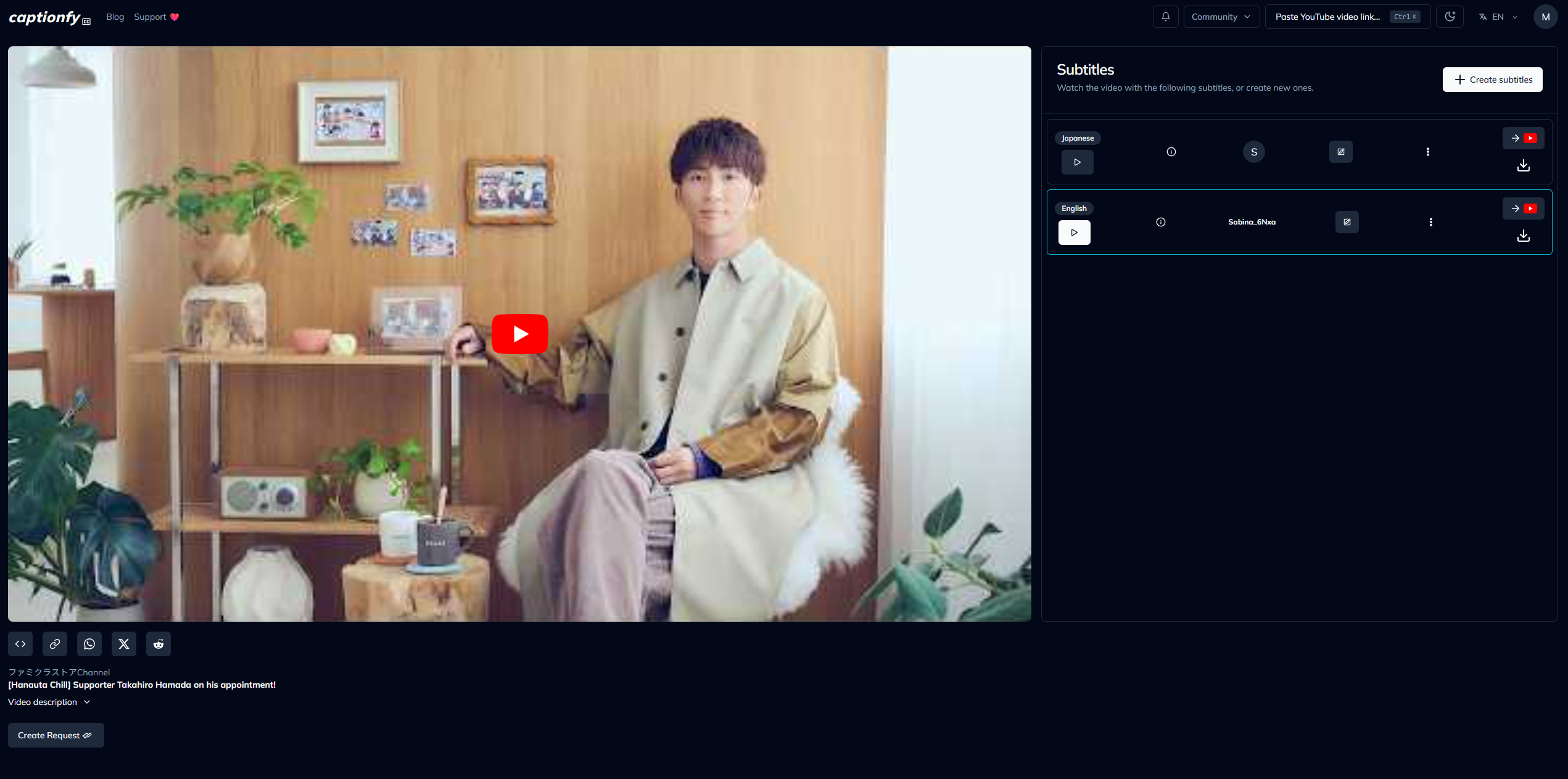
Once the video has loaded, navigate to the Subtitles panel on the right-hand side and click “+ Create subtitles.”
From there, select your target language and begin creating your subtitles within the editor.
Step Four
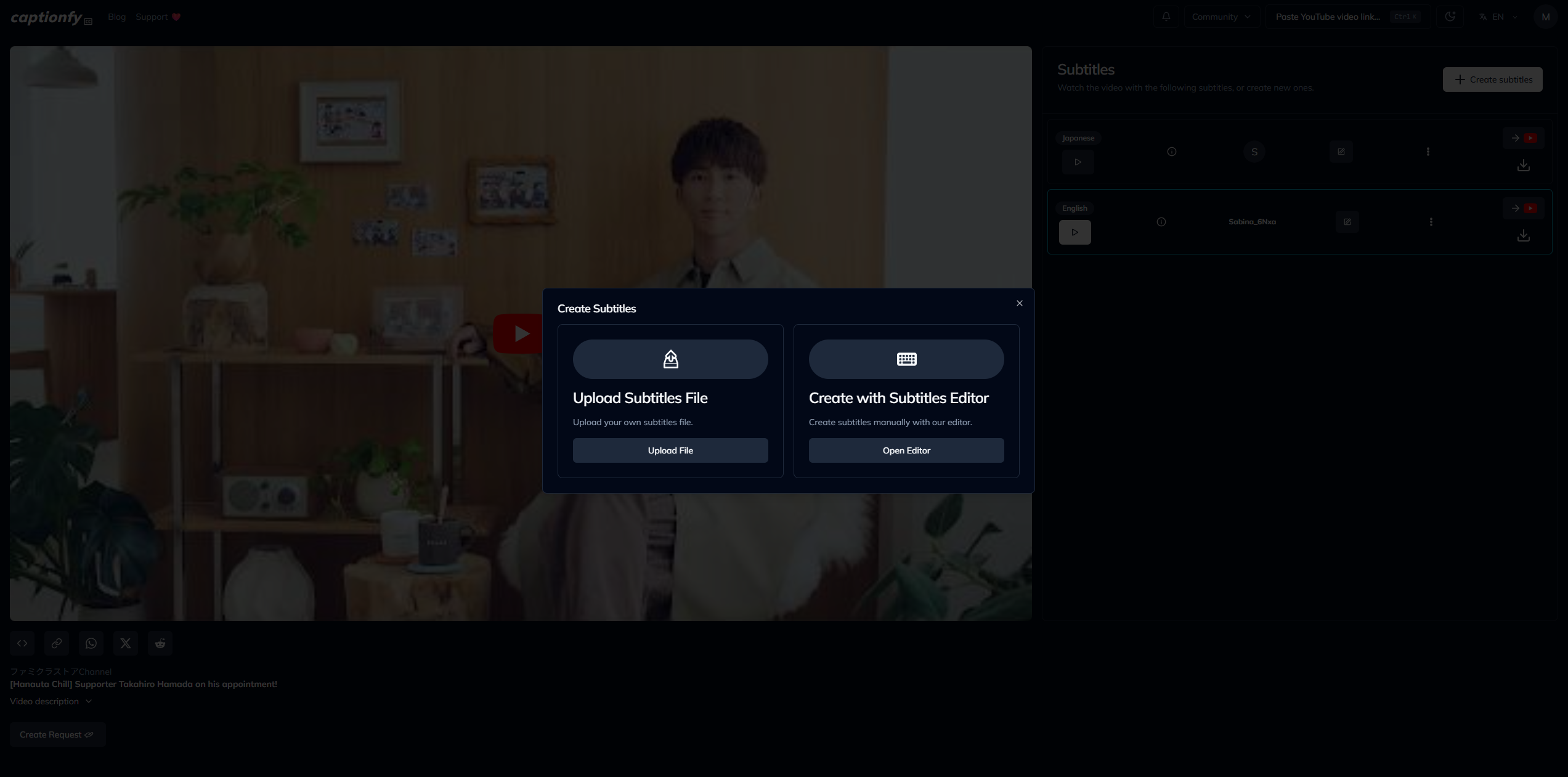
A pop-up will appear with two options:
- Upload Subtitles File (if you already have a completed file such as .SRT or .VTT)
- Create with Subtitles Editor (to create subtitles directly on Captionfy)
Select “Create with Subtitles Editor” to begin translating within the platform, or choose “Upload Subtitles File” if you are submitting an existing file.
Step Five
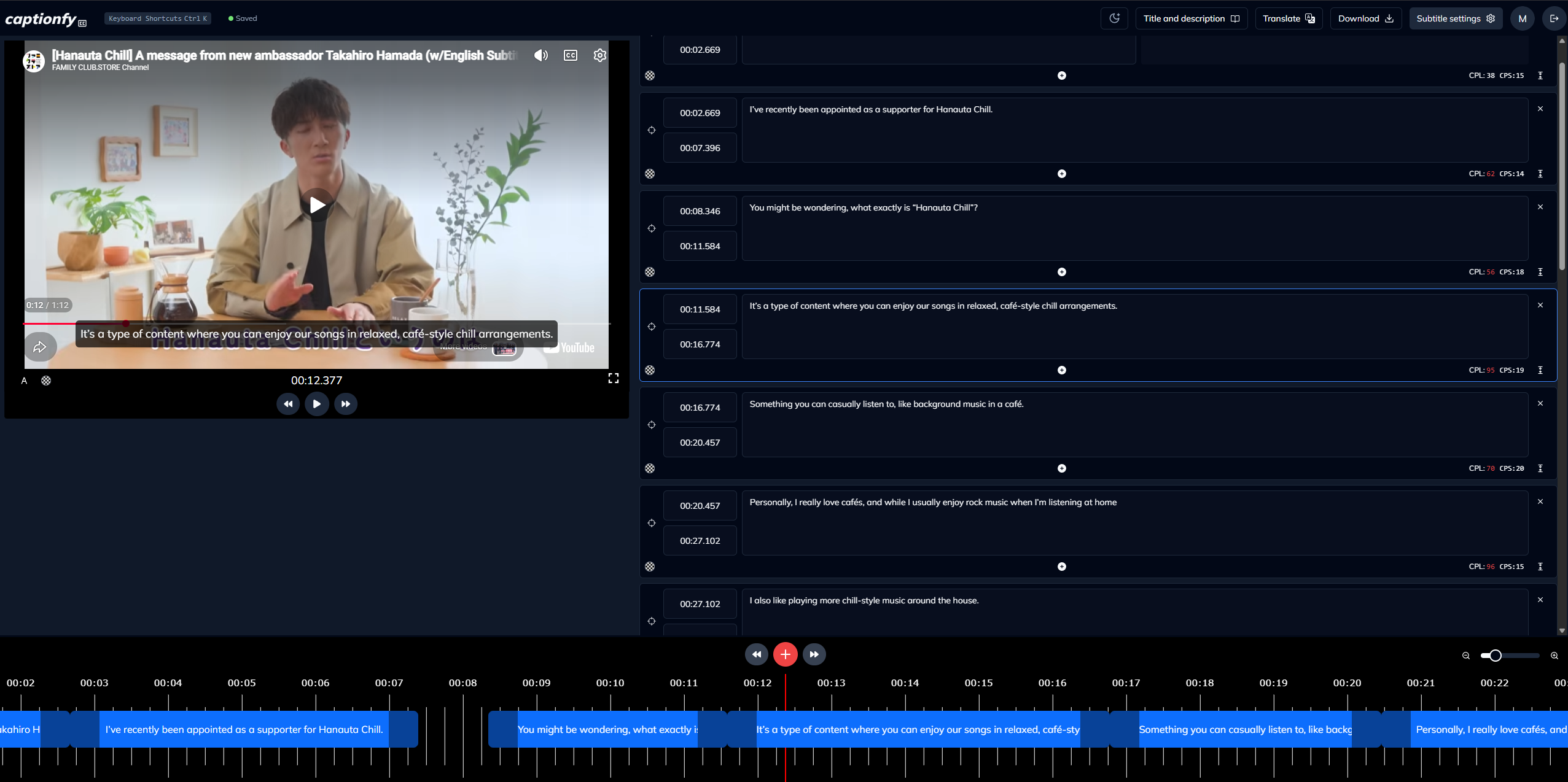
Once the video loads, start creating subtitles directly in the editor. Captionfy will automatically pause between subtitle entries to help you keep pace.
- Type your subtitles directly into each caption box on the right
- Use the “+” button (either on the timeline or below a caption box) to create new subtitle blocks
- Adjust timing by dragging the caption bubbles along the timeline
- Play and pause the video to sync your subtitles accurately
If available, you can also choose to start from existing captions (such as YouTube’s auto-generated subtitles or use other languages’ timing) and use them as a base for your translation.
Captionfy also allows you to stylize subtitles (such as adding colors or changing size). While this can be helpful for personal or shared viewing, please note that submissions to the channels listed above should not include stylized subtitles. Keep formatting clean and standard for compatibility.
Step Six
Review your subtitles once complete. Check for accuracy, timing, and any typos to ensure the best viewing experience.
It’s encouraged to include your credit/name at the end of the subtitles, but try to keep it to only one line. For example:
“(Translation by: @Dumpling Box)” or “Translation made by Dumpling Box.”
Step Seven
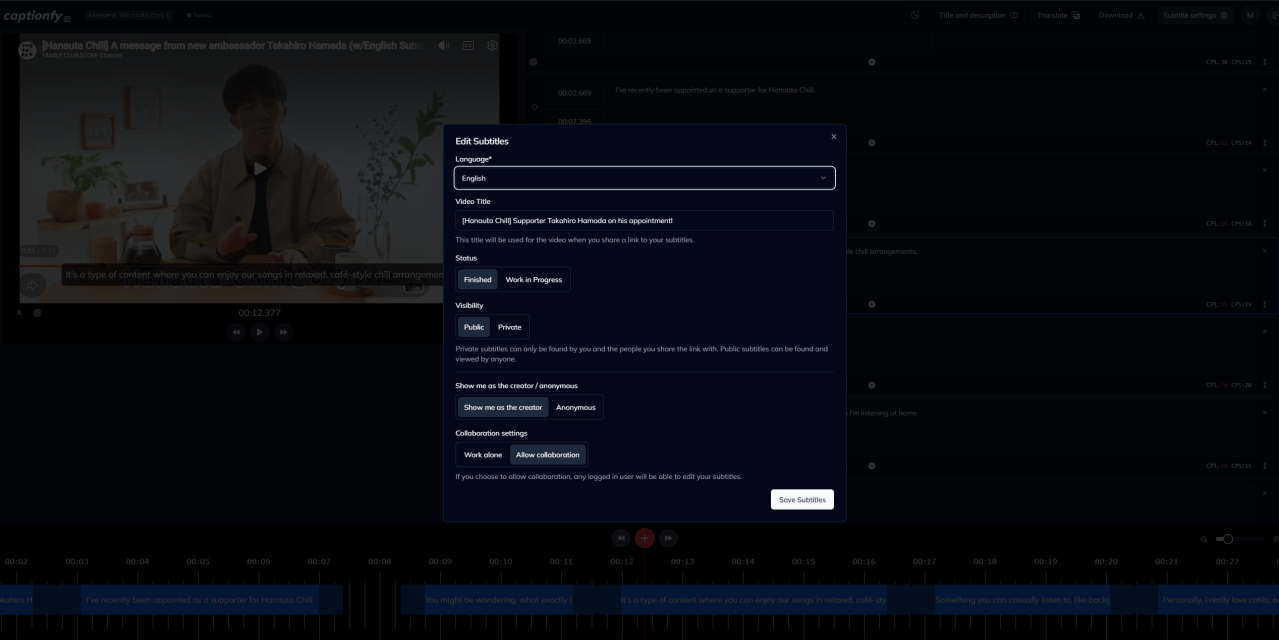
Once you are satisfied with your subtitles, save your work. In Subtitle settings, you can choose to:
- Mark your subtitles as Work in Progress if they are not fully complete
- Set them as Finished so they can be viewed and accessed on Captionfy
- Choose whether to allow collaboration or keep the subtitles private
Once finished, remember to also translate the video’s title and description. Make sure your subtitles are clearly labeled and finalized before submission.
Step Eight
Download your subtitles in your preferred format (such as .SRT or .VTT) using the Download option in the editor or on the project page.
Or use the Share link option to share the link to the project page.
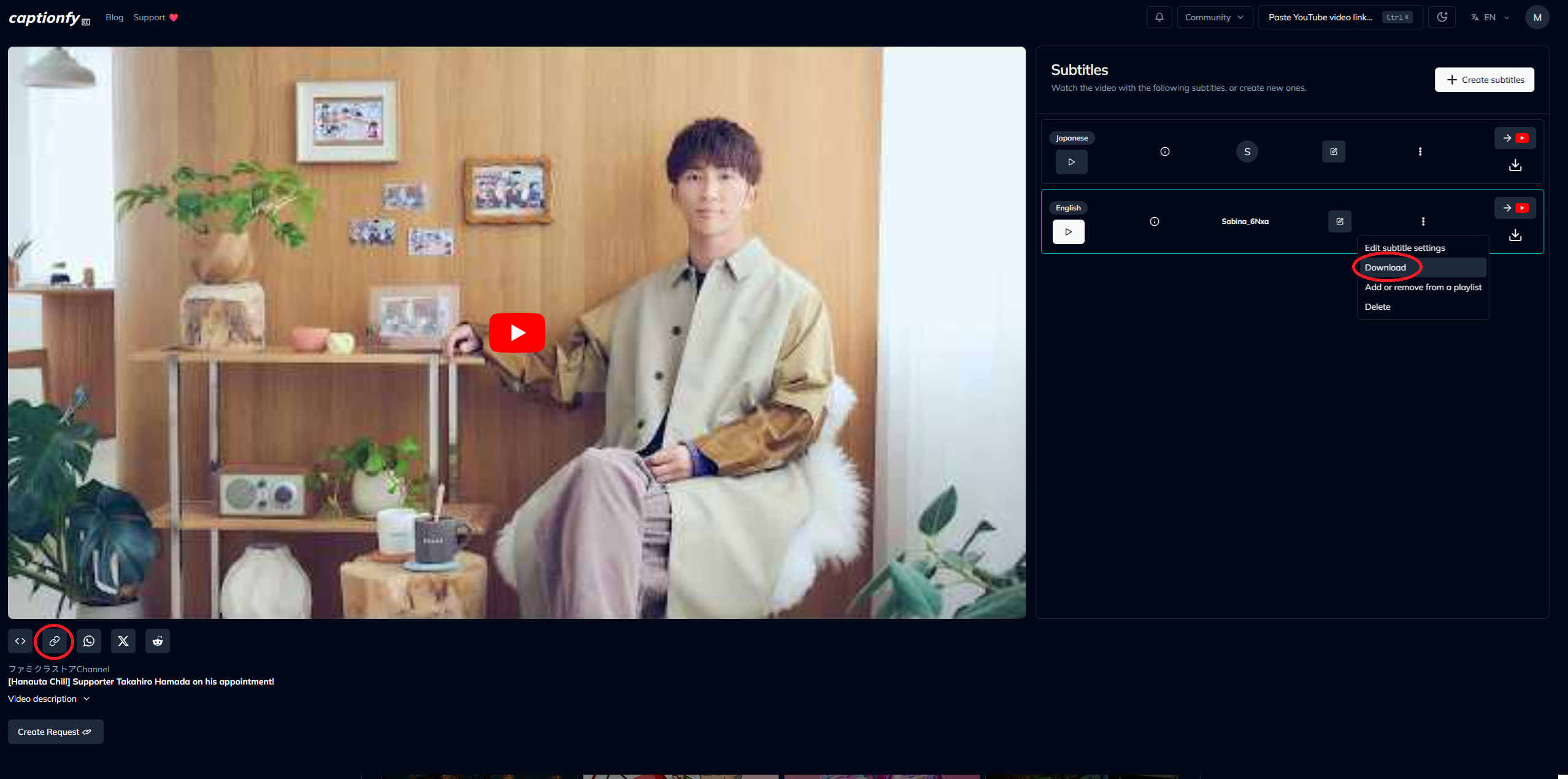
Send your completed subtitle file/project page link to the following email address:
Please make sure to specify the language of your subtitles when submitting.
Upon receipt, the translation will be reviewed by staff, and once approved, the subtitles will be uploaded to the corresponding channel’s YouTube admin account to watch directly from YouTube!
Example:
Topic: English Subtites for Aぇ! group 単独YouTubeチャンネル開設!

Hello!

Here are the English Subtitles for Aぇ! group 単独YouTubeチャンネル開設!
https://amara.org/videos/XtWGBYvVi0z9/en/4532093/

Have a great day ✌️
Please note the following when submitting:
・At present, only subtitles for videos currently published to the above-listed channels can be accepted.
・Some videos may be ineligible for volunteer subtitling, at the sole discretion of STARTO ENTERTAINMENT’s YouTube Production Team.
・In the event of multiple submissions for the same video and language, only one will be accepted.
・Submissions without accompanying translations of a video’s title and video description may be processed with machine translation for these elements.
・Changes to the service, including but not limited to the method or timeframe of submission acceptance, may be implemented without prior notice.
・All necessary measures will be taken for strict safety management so that the personal information kept will not be obtained unreasonably by a third party.
If you have any questions or problems, feel free to reach out to us at Discord or on X (Twitter) or comment below!
Amara Version: How to Submit Subtitles to a STARTO ENTERTAINMENT Talent or Group Channel
Step One
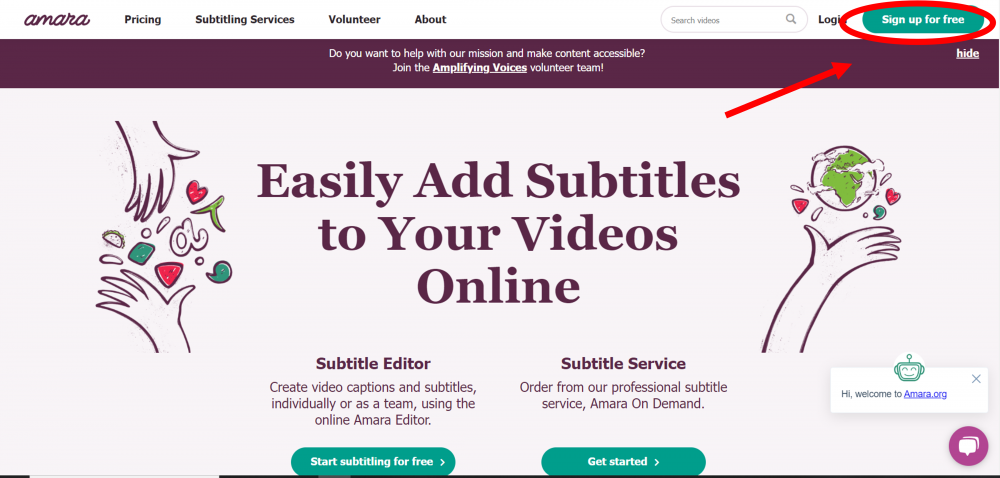
Register for a free account at https://amara.org
Step Two
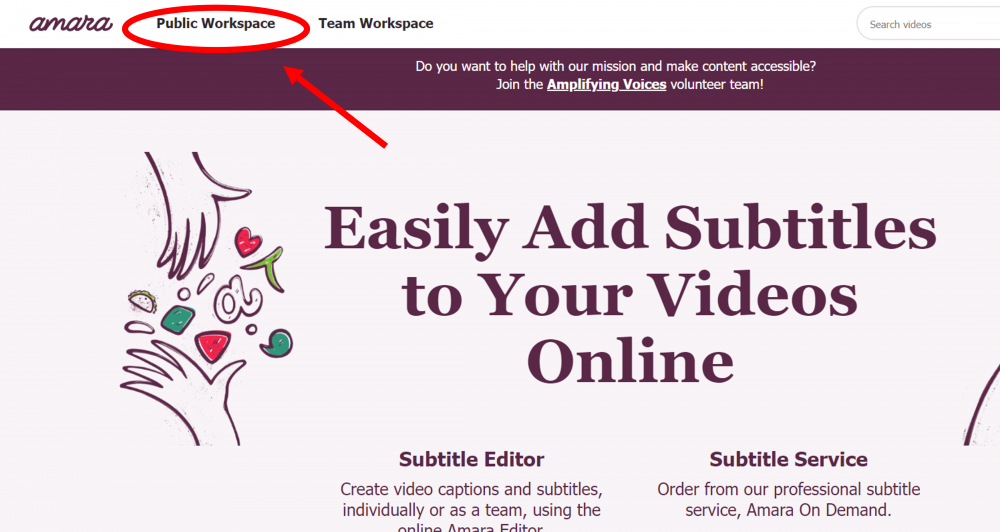
Select the “Amara Public Workspace” option in the upper left navigation, and follow the instructions to add a video for which you wish to create subtitles OR help someone else finish theirs.
Step Three
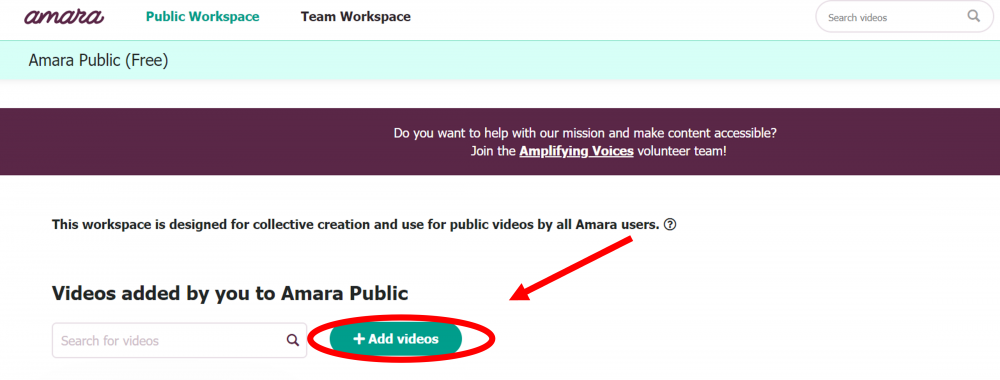
Click the button to add a new video.
Step Four
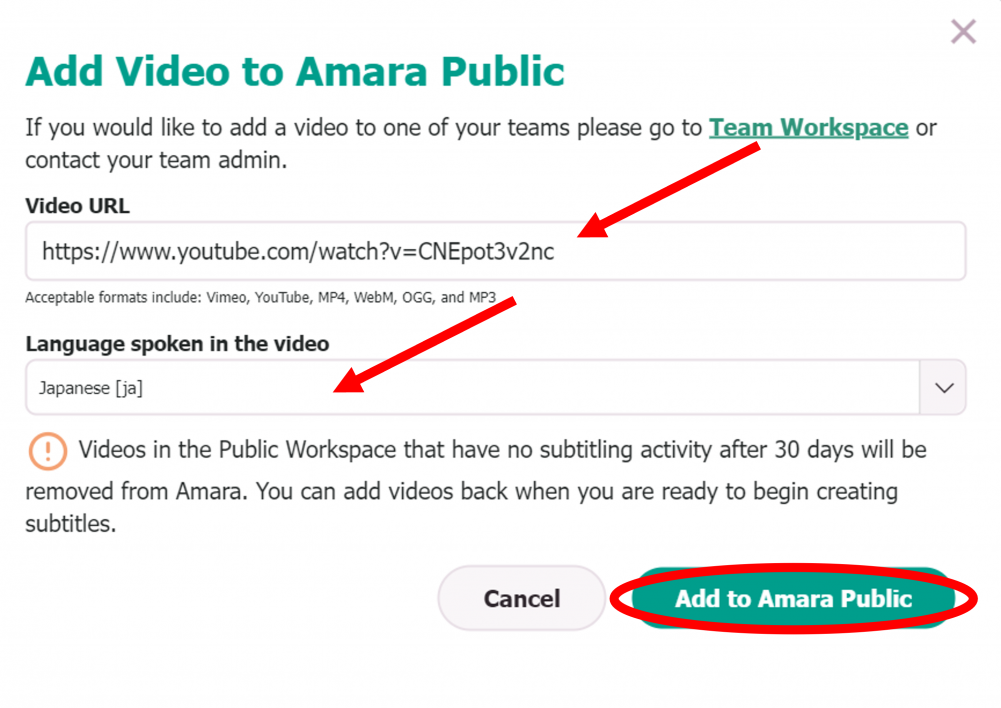
Paste the video URL from YouTube into the space provided, and select the original language of the video (usually Japanese). Once complete, click “Add to Amara Public.”
When adding a YouTube Short video, replace the “/shorts/” with “/watch?v=” to make the link work.
Step Five
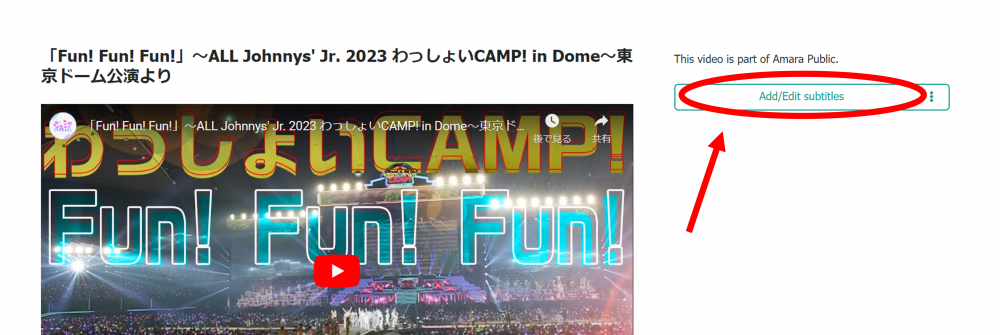
Click “Add/Edit Subtitles.”
Step Six
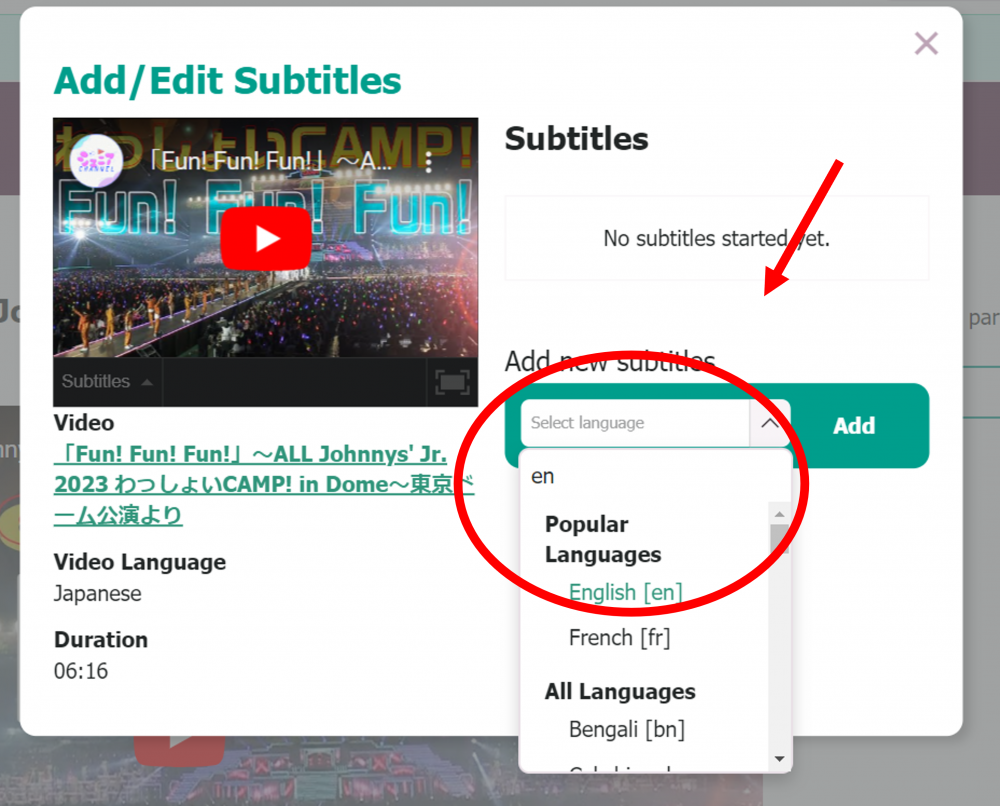
Choose your desired language from the list of options, then use Amara.org’s custom software to create your subtitles.
It’s encouraged to add your own credit at the end of the subtitles too! For example: “(Translation by: @Dumpling Box)” or “Translation made by Dumpling Box.“
Here’s also Amara’s own guide how to create subtitles through their site.
Step Seven
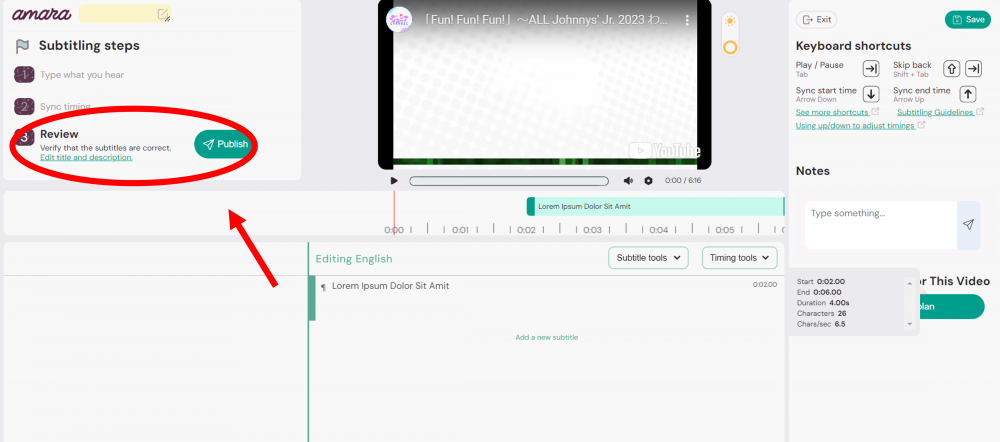
Once finished, make sure to also translate the video’s title and description, then click the “Publish” button.
Step Eight
Once published, grab the URL to your published subtitles and copy it.
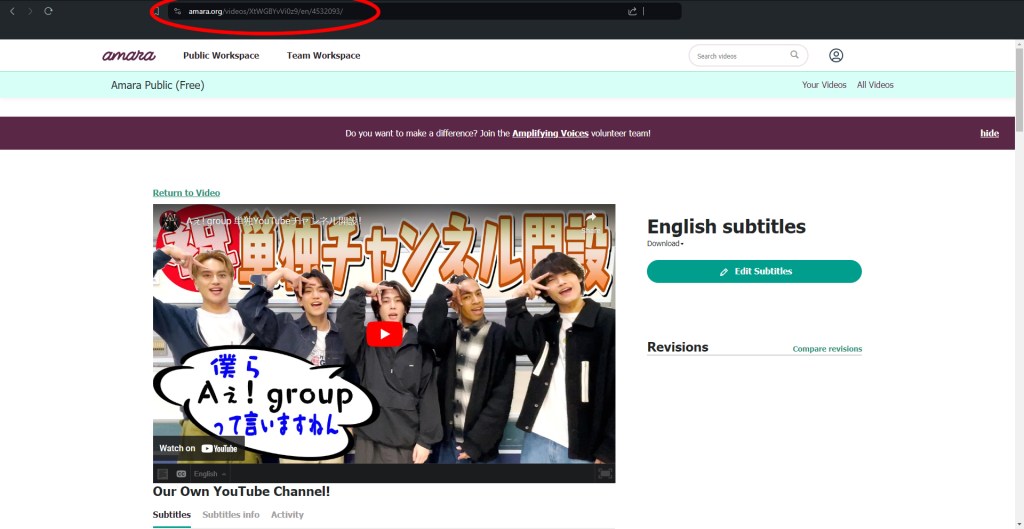
Send the Amara video URL to the below email address:
*Please be sure to provide the specific URL of the language you have subtitled.
Upon receipt, the translation will be reviewed by staff, and once approved, the subtitles will be uploaded to the corresponding channel’s YouTube admin account to watch directly from YouTube!
Example:
Topic: English Subtites for Aぇ! group 単独YouTubeチャンネル開設!

Hello!

Here are the English Subtitles for Aぇ! group 単独YouTubeチャンネル開設!
https://amara.org/videos/XtWGBYvVi0z9/en/4532093/

Have a great day ✌️
Please note the following when submitting:
・At present, only subtitles for videos currently published to the above-listed channels can be accepted.
・Some videos may be ineligible for volunteer subtitling, at the sole discretion of STARTO ENTERTAINMENT’s YouTube Production Team.
・In the event of multiple submissions for the same video and language, only one will be accepted.
・Submissions without accompanying translations of a video’s title and video description may be processed with machine translation for these elements.
・Changes to the service, including but not limited to the method or timeframe of submission acceptance, may be implemented without prior notice.
・All necessary measures will be taken for strict safety management so that the personal information kept will not be obtained unreasonably by a third party.
If you have any questions or problems, feel free to reach out to us at Discord or on X (Twitter) or comment below!